
ActionSheet 操作面板
介绍
从底部弹出的操作菜单面板,使用系统原生半模态效果,支持标题、描述、多选项、取消按钮、关闭拦截等功能。常用于提供一组操作供用户选择。
引入
typescript
import { TnActionSheet, TnActionSheetItem } from "@tuniao/tn-ui";代码演示
基础用法
通过 visible 控制面板的显示与隐藏,actions 传入选项列表。每个选项通过 TnActionSheetItem 创建。
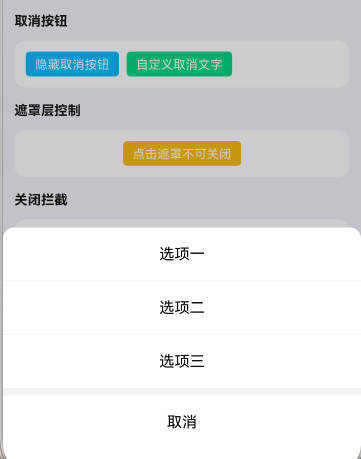
点我查看代码
typescript
import { TnActionSheet, TnActionSheetItem } from "@tuniao/tn-ui";

@Entry
@ComponentV2
struct ActionSheetBasic {
  @Local visible: boolean = false;

  build() {
    Column() {
      Button("基础面板")
        .onClick(() => {
          this.visible = true;
        })
      TnActionSheet({
        visible: this.visible,
        $visible: (val: boolean) => {
          this.visible = val;
        },
        actions: [
          new TnActionSheetItem("选项一"),
          new TnActionSheetItem("选项二"),
          new TnActionSheetItem("选项三")
        ],
        onSelect: (index: number, value: string) => {
          console.info(`选择了第 ${index + 1} 项`);
        },
      })
    }
  }
}
带标题
通过 title 属性设置面板标题。
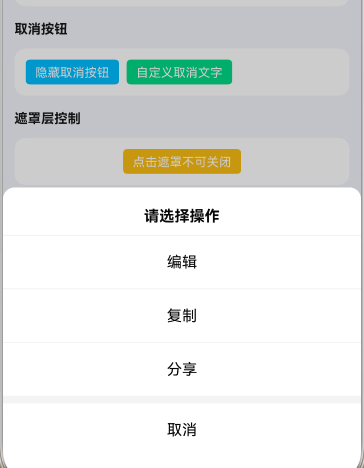
点我查看代码
typescript
TnActionSheet({
  visible: this.visible,
  $visible: (val: boolean) => {
    this.visible = val;
  },
  title: "请选择操作",
  actions: [
    new TnActionSheetItem("编辑", "", "edit"),
    new TnActionSheetItem("复制", "", "copy"),
    new TnActionSheetItem("分享", "", "share")
  ],
  onSelect: (index: number, value: string) => {
    console.info(`操作: ${value}`);
  },
})
带标题和描述
通过 description 属性设置面板描述文本,显示在标题下方。
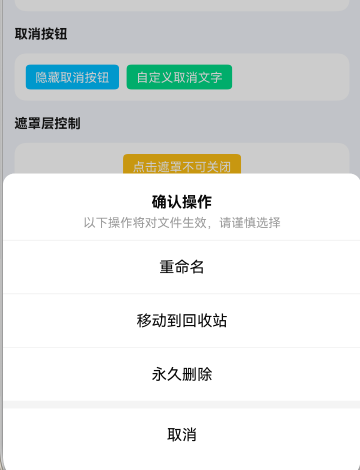
点我查看代码
typescript
TnActionSheet({
  visible: this.visible,
  $visible: (val: boolean) => {
    this.visible = val;
  },
  title: "确认操作",
  description: "以下操作将对文件生效,请谨慎选择",
  actions: [
    new TnActionSheetItem("重命名"),
    new TnActionSheetItem("移动到回收站"),
    new TnActionSheetItem("永久删除")
  ],
  onSelect: (index: number) => {
    console.info(`选择了第 ${index + 1} 项`);
  },
})
选项描述
通过 TnActionSheetItem 的第二个参数设置选项的描述文本,显示在选项文字下方。
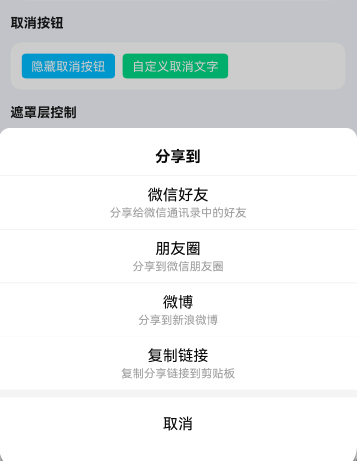
点我查看代码
typescript
TnActionSheet({
  visible: this.visible,
  $visible: (val: boolean) => {
    this.visible = val;
  },
  title: "分享到",
  actions: [
    new TnActionSheetItem("微信好友", "分享给微信通讯录中的好友"),
    new TnActionSheetItem("朋友圈", "分享到微信朋友圈"),
    new TnActionSheetItem("微博", "分享到新浪微博"),
    new TnActionSheetItem("复制链接", "复制分享链接到剪贴板")
  ],
  onSelect: (index: number) => {
    const names: string[] = ["微信好友", "朋友圈", "微博", "复制链接"];
    console.info(`分享到${names[index]}`);
  },
})
自定义选项颜色
通过 TnActionSheetItem 的第五个参数 color 自定义选项文字颜色。
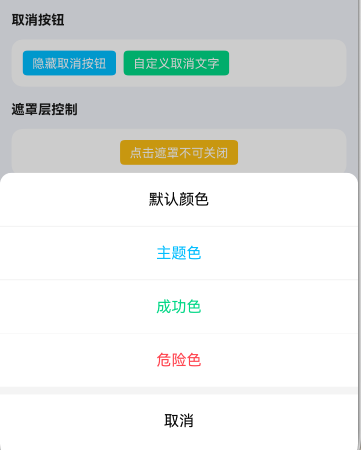
点我查看代码
typescript
import {
  TnActionSheet, TnActionSheetItem,
  getThemeColor, TnUIBaseStyle, TnUIBaseStyleType
} from "@tuniao/tn-ui";
import { AppStorageV2 } from "@kit.ArkUI";
import { TnAppStorageKey } from "@tuniao/tn-ui/src/main/ets/common/storage_key";

@Entry
@ComponentV2
struct ActionSheetCustomColor {
  @Local visible: boolean = false;
  @Local baseStyle: TnUIBaseStyleType = AppStorageV2.connect(TnUIBaseStyle, TnAppStorageKey.BASE_STYLE)!;

  build() {
    Column() {
      Button("自定义颜色")
        .onClick(() => {
          this.visible = true;
        })
      TnActionSheet({
        visible: this.visible,
        $visible: (val: boolean) => {
          this.visible = val;
        },
        actions: [
          new TnActionSheetItem("默认颜色"),
          new TnActionSheetItem("主题色", "", "", false, getThemeColor(this.baseStyle, "primary")),
          new TnActionSheetItem("成功色", "", "", false, getThemeColor(this.baseStyle, "success")),
          new TnActionSheetItem("危险色", "", "", false, getThemeColor(this.baseStyle, "danger"))
        ],
        onSelect: (index: number) => {
          console.info(`选择了第 ${index + 1} 项`);
        },
      })
    }
  }
}
禁用选项
通过 TnActionSheetItem 的第四个参数 disabled 设置选项为禁用状态,禁用后选项不可点击且显示为半透明。
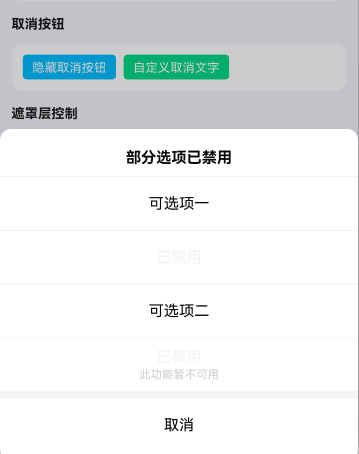
点我查看代码
typescript
TnActionSheet({
  visible: this.visible,
  $visible: (val: boolean) => {
    this.visible = val;
  },
  title: "部分选项已禁用",
  actions: [
    new TnActionSheetItem("可选项一"),
    new TnActionSheetItem("已禁用", "", "", true),
    new TnActionSheetItem("可选项二"),
    new TnActionSheetItem("已禁用", "此功能暂不可用", "", true)
  ],
  onSelect: (index: number) => {
    console.info(`选择了第 ${index + 1} 项`);
  },
})
隐藏取消按钮
通过 showCancel 属性控制是否显示底部取消按钮,默认显示。
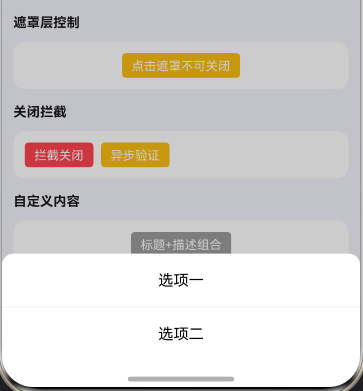
点我查看代码
typescript
TnActionSheet({
  visible: this.visible,
  $visible: (val: boolean) => {
    this.visible = val;
  },
  showCancel: false,
  actions: [
    new TnActionSheetItem("选项一"),
    new TnActionSheetItem("选项二")
  ],
  onSelect: (index: number) => {
    console.info(`选择了第 ${index + 1} 项`);
  },
})
自定义取消按钮文字
通过 cancelText 属性自定义取消按钮的文字,默认为"取消"。
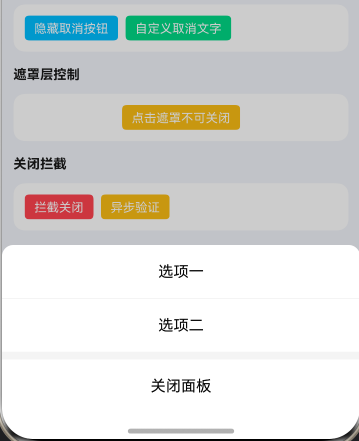
点我查看代码
typescript
TnActionSheet({
  visible: this.visible,
  $visible: (val: boolean) => {
    this.visible = val;
  },
  cancelText: "关闭面板",
  actions: [
    new TnActionSheetItem("选项一"),
    new TnActionSheetItem("选项二")
  ],
  onSelect: (index: number) => {
    console.info(`选择了第 ${index + 1} 项`);
  },
  onCancel: () => {
    console.info("点击了关闭面板");
  },
})
点击遮罩不关闭
通过 overlayCloseable 属性控制点击遮罩层是否关闭面板,默认为 true。
点我查看代码
typescript
TnActionSheet({
  visible: this.visible,
  $visible: (val: boolean) => {
    this.visible = val;
  },
  overlayCloseable: false,
  title: "点击遮罩不可关闭",
  actions: [
    new TnActionSheetItem("选项一"),
    new TnActionSheetItem("选项二")
  ],
  onSelect: (index: number) => {
    console.info(`选择了第 ${index + 1} 项`);
  },
})
关闭前拦截
通过 beforeClose 属性设置关闭前的拦截回调。回调接收操作类型、选项索引和选项标识值,返回 false 或 Promise<false> 可阻止面板关闭。
点我查看代码
typescript
import { TnActionSheet, TnActionSheetItem, TnActionSheetCloseAction } from "@tuniao/tn-ui";

// 同步拦截
TnActionSheet({
  visible: this.visible,
  $visible: (val: boolean) => {
    this.visible = val;
  },
  title: "关闭拦截",
  actions: [
    new TnActionSheetItem("允许关闭"),
    new TnActionSheetItem("阻止关闭", "", "block")
  ],
  beforeClose: (action: TnActionSheetCloseAction, index?: number, value?: string): boolean => {
    if (action === "select" && value === "block") {
      console.info("此选项已被拦截,无法关闭");
      return false;
    }
    return true;
  },
  onSelect: (index: number) => {
    console.info(`选择了第 ${index + 1} 项`);
  },
})
异步关闭拦截
beforeClose 也支持返回 Promise<boolean>,适用于需要异步验证的场景。
点我查看代码
typescript
TnActionSheet({
  visible: this.visible,
  $visible: (val: boolean) => {
    this.visible = val;
  },
  title: "异步验证",
  description: "选择后模拟异步请求(1秒)",
  actions: [
    new TnActionSheetItem("提交订单"),
    new TnActionSheetItem("取消订单")
  ],
  beforeClose: (action: TnActionSheetCloseAction): Promise<boolean> => {
    return new Promise<boolean>((resolve: Function) => {
      if (action === "select") {
        console.info("处理中...");
        setTimeout(() => {
          resolve(true);
        }, 1000);
      } else {
        resolve(true);
      }
    });
  },
  onSelect: (index: number) => {
    const names: string[] = ["提交订单", "取消订单"];
    console.info(`${names[index]}成功`);
  },
})
API
Props
| 参数 | 说明 | 类型 | 默认值 |
|---|---|---|---|
| visible | 是否显示操作面板 | boolean | false |
| actions | 选项列表 | TnActionSheetItem[] | [] |
| title | 面板标题 | string | - |
| description | 面板描述文本 | string | - |
| cancelText | 取消按钮文字 | string | "取消" |
| showCancel | 是否显示取消按钮 | boolean | true |
| overlayCloseable | 点击遮罩层是否关闭面板 | boolean | true |
| closeOnBackPress | 返回键是否关闭面板 | boolean | true |
| safeAreaInsetBottom | 是否适配底部安全区 | boolean | true |
| beforeClose | 关闭前拦截回调,返回 false 可阻止关闭 | TnActionSheetBeforeClose | - |
Events
| 事件名 | 说明 | 回调参数 |
|---|---|---|
| onSelect | 选项被选中时触发 | (index: number, value: string) => void |
| onCancel | 点击取消按钮时触发 | () => void |
| onOpen | 面板打开时触发 | () => void |
| onClose | 面板关闭时触发 | () => void |
| $visible | 面板显示状态变化(双向绑定) | (visible: boolean) => void |
类型定义
TnActionSheetItem
操作面板选项类,通过构造函数创建:
typescript
new TnActionSheetItem(text: string, desc?: string, value?: string, disabled?: boolean, color?: ResourceColor)| 参数 | 说明 | 类型 | 默认值 |
|---|---|---|---|
| text | 选项文本 | string | "" |
| desc | 选项描述 | string | "" |
| value | 选项标识值,用于 onSelect 和 beforeClose 回调 | string | "" |
| disabled | 是否禁用 | boolean | false |
| color | 自定义文字颜色 | ResourceColor | - |
TnActionSheetCloseAction
typescript
type TnActionSheetCloseAction = "select" | "cancel";| 值 | 说明 |
|---|---|
"select" | 选择了某个选项 |
"cancel" | 点击了取消按钮 |
TnActionSheetBeforeClose
typescript
type TnActionSheetBeforeClose =
(action: TnActionSheetCloseAction, index?: number, value?: string) => boolean | Promise<boolean>;| 参数 | 说明 | 类型 |
|---|---|---|
| action | 触发的操作类型 | TnActionSheetCloseAction |
| index | 选中项索引(仅 "select" 时有值) | number |
| value | 选中项标识值(仅 "select" 时有值) | string |