
PhotoAlbum 相册
介绍
用于展示图片列表的相册组件,支持多列布局、最大数量限制、点击预览等功能。常用于社交动态、商品图片展示等场景。
引入
typescript
import { TnPhotoAlbum } from "@tuniao/tn-ui";代码演示
基础用法
通过 data 属性传入图片 URL 地址数组,默认以 3 列网格布局展示,点击图片可全屏预览。

点我查看代码
typescript
import { TnPhotoAlbum } from "@tuniao/tn-ui";

@Entry
@ComponentV2
struct PhotoAlbumBasic {
  private images: string[] = [
    "https://resource.tuniaokj.com/images/album/xiong1.jpg",
    "https://resource.tuniaokj.com/images/album/xiong2.jpg",
    "https://resource.tuniaokj.com/images/album/xiong3.jpg",
    "https://resource.tuniaokj.com/images/album/xiong4.jpg",
    "https://resource.tuniaokj.com/images/album/xiong5.jpg",
    "https://resource.tuniaokj.com/images/album/xiong6.jpg",
    "https://resource.tuniaokj.com/images/album/xiong7.jpg",
    "https://resource.tuniaokj.com/images/album/xiong8.jpg",
    "https://resource.tuniaokj.com/images/album/xiong9.jpg"
  ];

  build() {
    Column() {
      TnPhotoAlbum({ data: this.images });
    }
    .padding(15)
  }
}
修改列数
通过 column 属性修改一行显示图片的数量。

点我查看代码
typescript
// 2 列显示
TnPhotoAlbum({
  data: this.images,
  column: 2
});

// 4 列显示
TnPhotoAlbum({
  data: this.images,
  column: 4
});

// 5 列显示
TnPhotoAlbum({
  data: this.images,
  column: 5
});
最大显示数量
通过 max 属性限制最大显示图片数量,超出部分不会渲染。

点我查看代码
typescript
// 最多显示 4 张
TnPhotoAlbum({
  data: this.images,
  max: 4
});

// 最多显示 6 张
TnPhotoAlbum({
  data: this.images,
  max: 6
});
图片显示模式
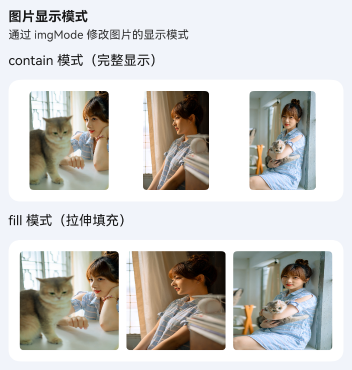
通过 imgMode 属性修改图片的填充方式,支持 cover(裁剪填充)、contain(完整显示)、fill(拉伸填充)、auto(自适应)。
点我查看代码
typescript
// contain 模式 - 保持比例完整显示
TnPhotoAlbum({
  data: this.images,
  imgMode: "contain"
});

// fill 模式 - 拉伸填充
TnPhotoAlbum({
  data: this.images,
  imgMode: "fill"
});
自定义圆角
通过 imgBorderRadius 属性修改图片的圆角大小。可传入 baseStyle 中的圆角值或自定义数值。

点我查看代码
typescript
import { TnPhotoAlbum, TnUIBaseStyle, TnUIBaseStyleType } from "@tuniao/tn-ui";
import { AppStorageV2 } from "@kit.ArkUI";
import { TnAppStorageKey } from "@tuniao/tn-ui/src/main/ets/common/storage_key";

@Entry
@ComponentV2
struct PhotoAlbumBorderRadius {
  @Local baseStyle: TnUIBaseStyleType = AppStorageV2.connect(TnUIBaseStyle, TnAppStorageKey.BASE_STYLE)!;

  private images: string[] = [
    "https://resource.tuniaokj.com/images/album/xiong1.jpg",
    "https://resource.tuniaokj.com/images/album/xiong2.jpg",
    "https://resource.tuniaokj.com/images/album/xiong3.jpg"
  ];

  build() {
    Column({ space: 20 }) {
      // 大圆角
      TnPhotoAlbum({
        data: this.images,
        imgBorderRadius: this.baseStyle.borderRadiusLg
      });

      // 圆形
      TnPhotoAlbum({
        data: this.images,
        imgBorderRadius: this.baseStyle.borderRadiusMax
      });
    }
    .padding(15)
  }
}
自定义间距
通过 gap 属性修改图片之间的间距(单位: vp),默认值为 8vp。

点我查看代码
typescript
import { TnPhotoAlbum, SPACE } from "@tuniao/tn-ui";

// 极小间距(2vp)
TnPhotoAlbum({
  data: this.images,
  gap: SPACE.MINI
});

// 中大间距(16vp)
TnPhotoAlbum({
  data: this.images,
  gap: SPACE.MLG
});
禁用预览
设置 preview 为 false 禁用点击预览功能。此时仍可通过 onImageClick 事件自行处理点击逻辑。
点我查看代码
typescript
TnPhotoAlbum({
  data: this.images,
  preview: false,
  onImageClick: (index: number) => {
    console.info(`点击了第 ${index + 1} 张图片`);
  }
});
监听点击事件
通过 onImageClick 事件监听图片点击,回调参数为被点击图片的索引。该事件在预览功能开启时同样会触发。
点我查看代码
typescript
TnPhotoAlbum({
  data: this.images,
  onImageClick: (index: number) => {
    console.info(`点击了第 ${index + 1} 张图片`);
  }
});
API
Props
| 参数 | 说明 | 类型 | 默认值 |
|---|---|---|---|
| data | 图片地址列表 | string[] | [] |
| max | 最大显示图片数量 | number | 9 |
| column | 每行显示的图片数量 | number | 3 |
| imgMode | 图片显示模式 | "cover" | "contain" | "fill" | "auto" | "cover" |
| preview | 点击图片是否全屏预览 | boolean | true |
| gap | 图片间距(vp) | number | 8 |
| imgBorderRadius | 图片圆角 | string | number | baseStyle.borderRadius |
Events
| 事件名 | 说明 | 回调参数 |
|---|---|---|
| onImageClick | 点击图片时触发 | (index: number) => void |
类型定义
typescript
/**
 * 图片显示模式
 */
type TnPhotoAlbumImgMode = "cover" | "contain" | "fill" | "auto";