
CountTo 数字跳转
介绍
用于数字的平滑变化动画,常用于数据面板、积分余额等场景。支持正数/倒数、缓动/匀速动画、千分位分隔符、小数位控制,并提供控制器用于手动控制动画的开始、暂停、继续和重置。
引入
typescript
import { TnCountTo, TnCountToController } from "@tuniao/tn-ui";代码演示
基础用法
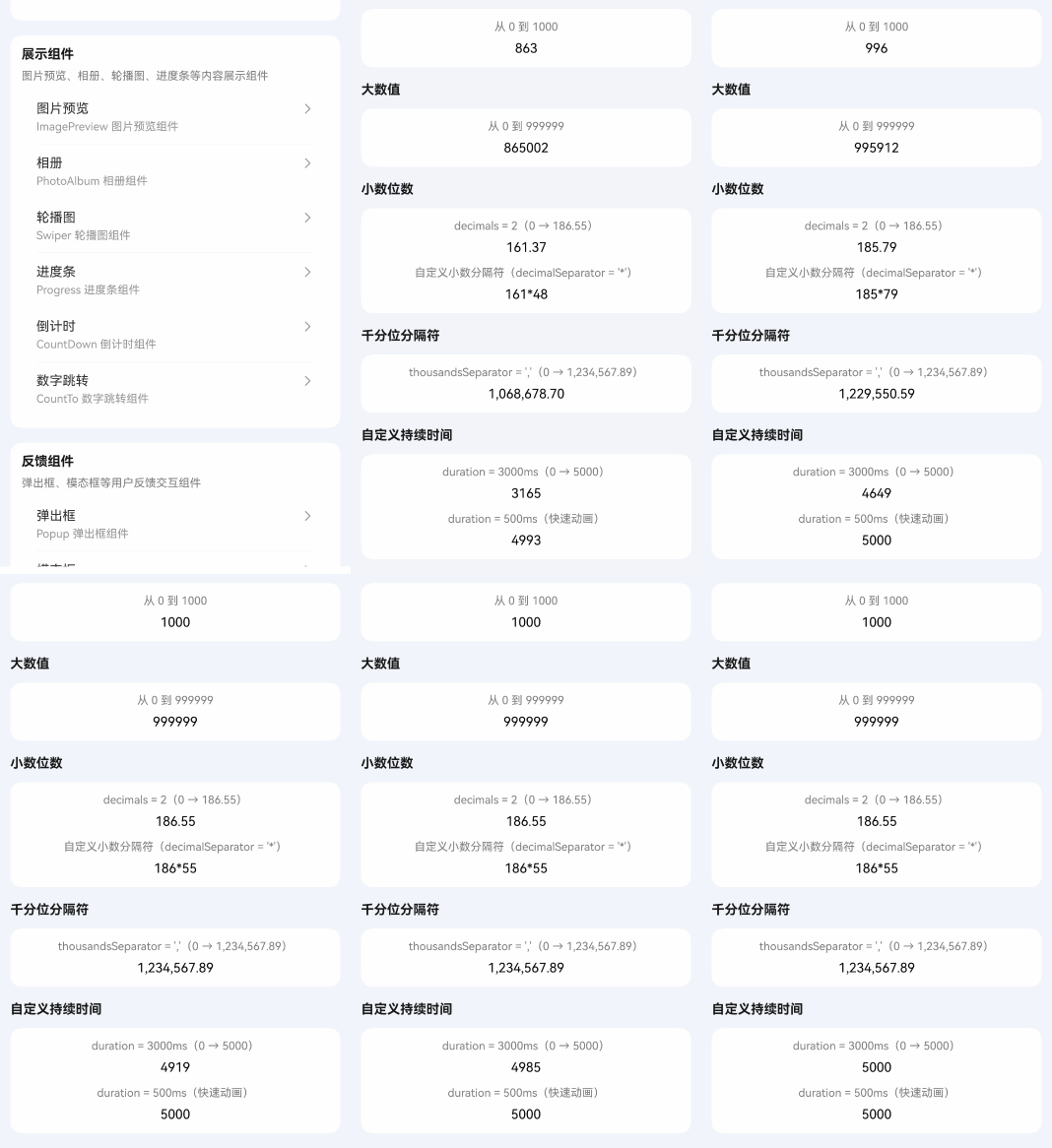
通过 endValue 属性设置目标数值,组件会从 startValue(默认 0)平滑变化到目标值。
点我查看代码
typescript
TnCountTo({ endValue: 1000 });大数值
支持大数值场景,数字会通过缓动动画平滑变化。
点我查看代码
typescript
TnCountTo({ endValue: 999999 });小数位数
通过 decimals 属性设置小数位数。通过 decimalSeparator 属性自定义小数点符号,默认为 .。
点我查看代码
typescript
// 保留 2 位小数
TnCountTo({ endValue: 186.55, decimals: 2 });

// 自定义小数分隔符
TnCountTo({ endValue: 186.55, decimals: 2, decimalSeparator: '*' });
千分位分隔符
通过 thousandsSeparator 属性设置千分位分隔符。不设置则不显示千分位。
点我查看代码
typescript
TnCountTo({
  endValue: 1234567.89,
  decimals: 2,
  thousandsSeparator: ','
});
自定义持续时间
通过 duration 属性设置动画持续时间,单位毫秒,默认 1500。
点我查看代码
typescript
// 慢速动画(3秒)
TnCountTo({ endValue: 5000, duration: 3000 });

// 快速动画(0.5秒)
TnCountTo({ endValue: 5000, duration: 500 });
倒数
当 startValue 大于 endValue 时,数字将从大到小变化。
点我查看代码
typescript
TnCountTo({ startValue: 1000, endValue: 0 });关闭缓动
默认使用缓动动画(easeOut),设置 useEasing 为 false 可切换为匀速动画。
点我查看代码
typescript
TnCountTo({ endValue: 500, useEasing: false });自定义颜色
通过 textColor 属性设置文字颜色,支持主题色名称(如 "primary"、"danger"、"success")和自定义色值(如 "#01beff")。
点我查看代码
typescript
// 主题色
TnCountTo({ endValue: 1000, textColor: "primary" });
TnCountTo({ endValue: 1000, textColor: "danger" });
TnCountTo({ endValue: 1000, textColor: "success" });

// 自定义 hex 色值
TnCountTo({ endValue: 1000, textColor: "#01beff" });
自定义字体大小和字重
通过 fontSize 属性设置字体大小(单位 vp),通过 fontWeight 属性设置字重。不设置 fontSize 时使用主题默认字体大小。
点我查看代码
typescript
// 不同字体大小
TnCountTo({ endValue: 1000, fontSize: 12 });
TnCountTo({ endValue: 1000, fontSize: 20 });

// 大字体 + 粗体
TnCountTo({
  endValue: 1000,
  fontSize: 30,
  fontWeight: FontWeight.Bold,
});

// 大字体 + 粗体 + 主题色
TnCountTo({
  endValue: 1000,
  fontSize: 30,
  fontWeight: FontWeight.Bold,
  textColor: "primary",
});
手动控制
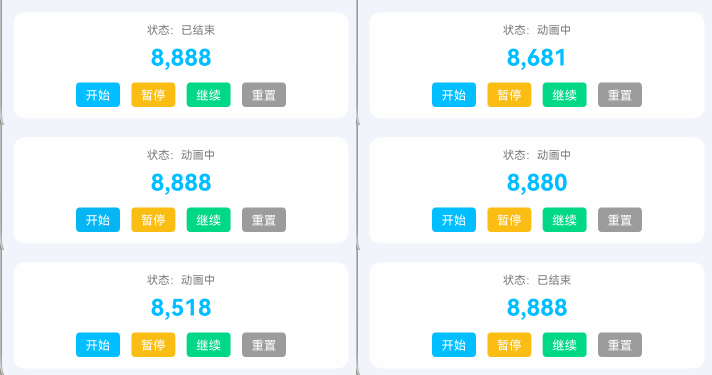
通过 controller 属性传入 TnCountToController 实例,配合 autoPlay: false 实现手动控制动画的开始、暂停、继续和重置。
类型说明
TnCountToController 控制器方法:
| 方法名 | 说明 | 参数 |
|---|---|---|
| start | 开始动画 | - |
| pause | 暂停动画 | - |
| resume | 从暂停处继续动画 | - |
| reset | 重置动画到初始状态 | - |
点我查看代码
typescript
@ComponentV2
struct CountToDemo {
  @Local controller: TnCountToController = new TnCountToController();
  @Local statusText: string = "未开始";

  build() {
    Column({ space: 12 }) {
      Text(`状态:${this.statusText}`);

      TnCountTo({
        endValue: 8888,
        autoPlay: false,
        controller: this.controller,
        textColor: "primary",
        fontSize: 24,
        fontWeight: FontWeight.Bold,
        thousandsSeparator: ',',
        onEnd: () => {
          this.statusText = "已结束";
        },
      });

      Row({ space: 12 }) {
        TnButton({
          content: "开始",
          btnSize: "sm",
          type: "primary",
          onBtnClick: () => {
            this.controller.start();
            this.statusText = "动画中";
          },
        });
        TnButton({
          content: "暂停",
          btnSize: "sm",
          type: "warning",
          onBtnClick: () => {
            this.controller.pause();
            this.statusText = "已暂停";
          },
        });
        TnButton({
          content: "继续",
          btnSize: "sm",
          type: "success",
          onBtnClick: () => {
            this.controller.resume();
            this.statusText = "动画中";
          },
        });
        TnButton({
          content: "重置",
          btnSize: "sm",
          type: "info",
          onBtnClick: () => {
            this.controller.reset();
            this.statusText = "未开始";
          },
        });
      }
    }
  }
}
API
Props
| 参数 | 说明 | 类型 | 默认值 |
|---|---|---|---|
| startValue | 起始数值 | number | 0 |
| endValue | 目标数值 | number | 0 |
| duration | 动画持续时间,单位毫秒 | number | 1500 |
| autoPlay | 是否自动开始动画 | boolean | true |
| decimals | 小数位数 | number | 0 |
| decimalSeparator | 小数点分隔符 | string | '.' |
| thousandsSeparator | 千分位分隔符,不设置则不显示千分位 | string | '' |
| useEasing | 是否使用缓动动画 | boolean | true |
| textColor | 文字颜色,支持主题色名称("primary" "success" "warning" "danger" "info")或自定义色值 | string | - |
| fontSize | 字体大小(vp),不设置时使用主题默认值 | number | 0 |
| fontWeight | 字重 | FontWeight | FontWeight.Normal |
| controller | 动画控制器 | TnCountToController | - |
Events
| 事件名 | 说明 | 回调参数 |
|---|---|---|
| onEnd | 动画结束时触发 | - |
TnCountToController 方法
| 方法名 | 说明 | 参数 | 返回值 |
|---|---|---|---|
| start | 开始动画 | - | void |
| pause | 暂停动画 | - | void |
| resume | 从暂停处继续动画 | - | void |
| reset | 重置动画到初始状态 | - | void |
主题色名称
textColor 支持以下主题色名称,使用时直接传入字符串即可:
| 名称 | 说明 |
|---|---|
"primary" | 主色 |
"success" | 成功色 |
"warning" | 警告色 |
"danger" | 危险色 |
"info" | 信息色 |