
Subsection 分段器
介绍
分段器组件,用于在多个选项之间进行切换选择。支持 default(带边框滑块)和 button(按钮式)两种模式,适用于视图切换、数据筛选等场景。
引入
typescript
import { TnSubsection } from "@tuniao/tn-ui";代码演示
基础用法
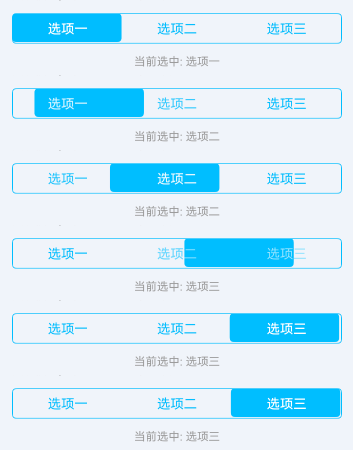
通过 modelValue 绑定当前选中项索引,items 设置选项列表,onChange 监听切换事件。默认使用 default 模式,带主题色边框和滑块。
点我查看代码
typescript
@Local basicIndex: number = 0;
basicItems: string[] = ["选项一", "选项二", "选项三"];

TnSubsection({
  modelValue: this.basicIndex,
  items: this.basicItems,
  onChange: (index: number) => {
    this.basicIndex = index;
  }
})
两个选项
支持仅两个选项的分段器。

点我查看代码
typescript
@Local twoItemIndex: number = 0;
twoItems: string[] = ["已支付", "未支付"];

TnSubsection({
  modelValue: this.twoItemIndex,
  items: this.twoItems,
  onChange: (index: number) => {
    this.twoItemIndex = index;
  }
})
多个选项
支持 5 个及以上选项的分段器。

点我查看代码
typescript
@Local multiIndex: number = 0;
multiItems: string[] = ["全部", "待付款", "待发货", "待收货", "已完成"];

TnSubsection({
  modelValue: this.multiIndex,
  items: this.multiItems,
  onChange: (index: number) => {
    this.multiIndex = index;
  }
})
按钮模式
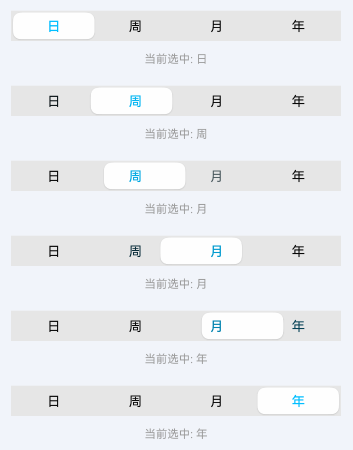
设置 mode 为 "button" 使用按钮模式,灰色背景搭配白色滑块,激活项文字显示主题色。
点我查看代码
typescript
@Local buttonModeIndex: number = 0;
buttonModeItems: string[] = ["日", "周", "月", "年"];

TnSubsection({
  modelValue: this.buttonModeIndex,
  items: this.buttonModeItems,
  mode: "button",
  onChange: (index: number) => {
    this.buttonModeIndex = index;
  }
})
自定义颜色 - 默认模式
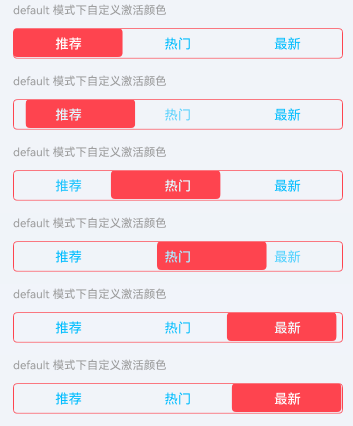
通过 activeColor 自定义激活项颜色。在 default 模式下,该颜色同时作用于边框和滑块背景。
点我查看代码
typescript
@Local colorIndex: number = 0;
colorItems: string[] = ["推荐", "热门", "最新"];

TnSubsection({
  modelValue: this.colorIndex,
  items: this.colorItems,
  activeColor: getThemeColor(this.baseStyle, "danger"),
  onChange: (index: number) => {
    this.colorIndex = index;
  }
})
自定义颜色 - 按钮模式
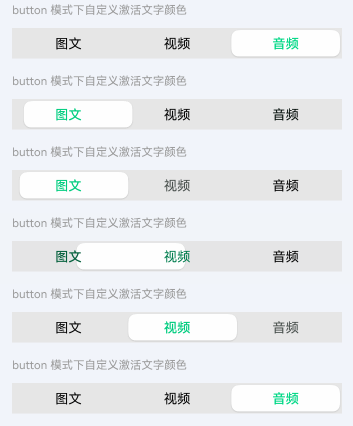
在 button 模式下,activeColor 作用于激活项的文字颜色。
点我查看代码
typescript
@Local colorButtonIndex: number = 0;
colorButtonItems: string[] = ["图文", "视频", "音频"];

TnSubsection({
  modelValue: this.colorButtonIndex,
  items: this.colorButtonItems,
  mode: "button",
  activeColor: getThemeColor(this.baseStyle, "success"),
  onChange: (index: number) => {
    this.colorButtonIndex = index;
  }
})
禁用状态
设置 disabled 属性后,分段器无法切换。

点我查看代码
typescript
@Local disabledIndex: number = 1;
disabledItems: string[] = ["选项一", "选项二", "选项三"];

TnSubsection({
  modelValue: this.disabledIndex,
  items: this.disabledItems,
  disabled: true,
  onChange: (index: number) => {
    this.disabledIndex = index;
  }
})
API
Props
| 参数 | 说明 | 类型 | 默认值 |
|---|---|---|---|
| modelValue | 当前选中项索引 | number | 0 |
| items | 分段选项列表 | string[] | [] |
| mode | 分段器模式 | "default" | "button" | "default" |
| disabled | 是否禁用 | boolean | false |
| activeColor | 激活项颜色(default 模式为滑块背景色和边框色,button 模式为激活文字色) | ResourceColor | 主题色(primary) |
| color | 未激活项文字颜色 | ResourceColor | default 模式为主题色,button 模式为主要文字色 |
Events
| 事件名 | 说明 | 回调参数 |
|---|---|---|
| onChange | 选中项切换时触发 | (index: number) => void |