
Form 表单
介绍
表单组件,用于数据收集和校验,支持多种校验规则、自定义校验函数,以及标签布局配置。由 TnForm 和 TnFormItem 组合使用。
引入
typescript
import { TnForm, TnFormItem, TnFormController } from "@tuniao/tn-ui";类型说明
TnFormController -- 表单控制器
| 方法 | 说明 | 参数 | 返回值 |
|---|---|---|---|
| validate | 校验全部字段 | callBack?: (valid: boolean, fields: TnFieldValidateInfo[]) => void | Promise<TnFormValidateResult> |
| validateField | 校验指定字段 | name: string, callBack?: (valid: boolean, field?: TnFieldValidateInfo) => void | Promise<TnFieldValidateResult> |
| resetValidation | 重置校验状态 | name?: string | string[] | void |
| getFormValues | 获取所有表单值 | - | Record<string, TnFieldValueType> |
| setFormValues | 批量设置表单值 | values: Record<string, TnFieldValueType> | void |
TnFormValidateResult -- 校验结果
typescript
interface TnFormValidateResult {
  valid: boolean;
  fields: TnFieldValidateInfo[];
}
TnFieldValidateResult -- 单字段校验结果
typescript
interface TnFieldValidateResult {
  valid: boolean;
  field: TnFieldValidateInfo;
}
TnFieldValidateInfo -- 校验信息
typescript
interface TnFieldValidateInfo {
  label: string;
  name: string;
  message: string;
}
TnFieldValueType -- 表单字段值类型
typescript
type TnFieldValueType = string | number | boolean | Array<string | number> | Array<Resource>;TnFormRuleItem -- 校验规则
| 属性 | 说明 | 类型 |
|---|---|---|
| required | 是否必填 | boolean |
| message | 校验失败提示信息 | ResourceStr |
| pattern | 正则校验 | RegExp |
| validator | 自定义校验函数 | (value: string) => boolean | string | Promise<boolean | string> |
| trigger | 触发方式 | "blur" | "change" |
| min | 最小长度/值 | number |
| max | 最大长度/值 | number |
代码演示
基础用法
TnForm 作为容器,内部放置 TnFormItem。每个 TnFormItem 通过 prop 绑定字段名,label 设置标签。
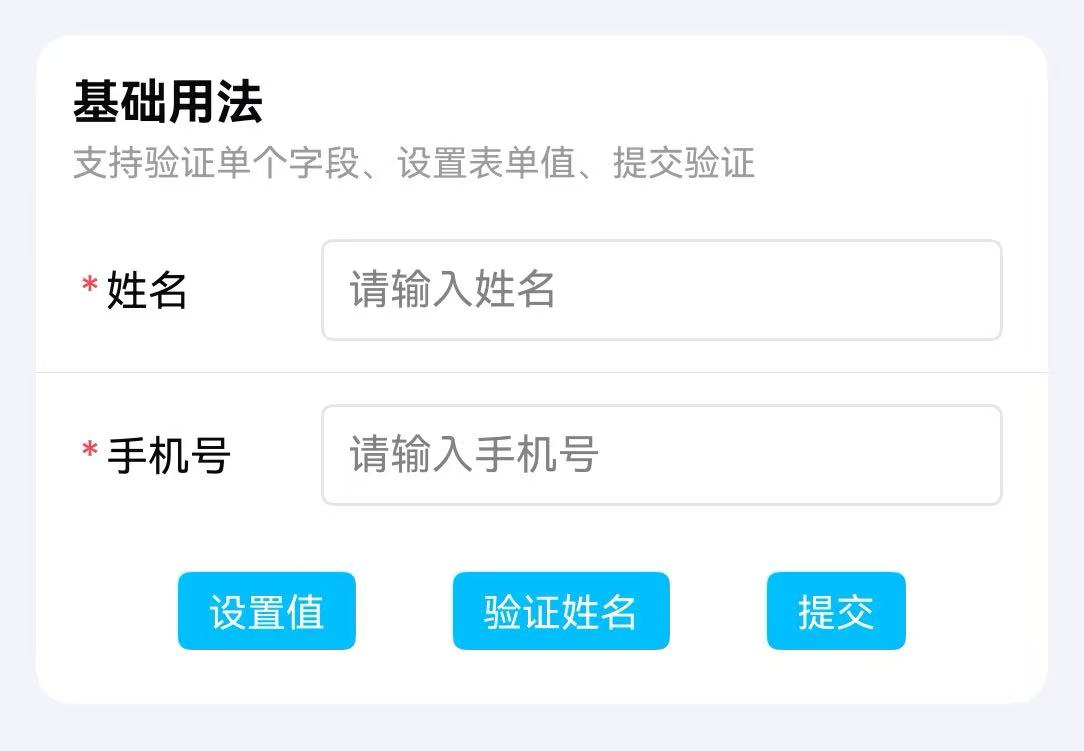
点我查看代码
typescript
@ObservedV2
export default class TnFormViewModel {
  /** 表单数据 */
  @Trace basicForm: BasicFormData = new BasicFormData();
  /** 表单控制器 */
  @Trace basicController: TnFormController = new TnFormController();
  /** 表单 ID */
  readonly basicFormId: string = "basicForm";
  /** 表单校验规则 */
  basicRules: TnFormRules = {
    "name": [
      { required: true, message: "请输入姓名" },
      { min: 2, max: 10, message: "姓名长度在2-10个字符之间" }
    ],
    "phone": [
      { required: true, message: "请输入手机号" }
    ]
  };

  /**
   * 提交表单
   */
  submitBasicForm(): void {
    this.basicController.validate().then((res): void => {
      if (res.valid) {
        this.validateResultMsg = "验证通过";
      } else {
        const labels: Array<string> = res.fields.map((item): string => item.label);
        this.validateResultMsg = `${labels.join(",")} 验证失败`;
      }
    });
  }
}

@Local  vm: TnFormViewModel = new TnFormViewModel();

@Builder
private BasicFormSection(): void {
  TnList({ title: "基础用法", description: "支持验证单个字段、设置表单值、提交验证", card: true }) {
    TnForm({
      formId: this.vm.basicFormId,
      rules: this.vm.basicRules,
      controller: this.vm.basicController
    }) {
      TnListItem({ bottomBorder: true }) {
        TnFormItem({
          formId: this.vm.basicFormId,
          prop: "name",
          label: "姓名",
          value: this.vm.basicForm.name,
          rules: [
            { required: true, message: "请输入姓名" },
            { min: 2, max: 10, message: "姓名长度在2-10个字符之间" }
          ]
        }) {
          TnInput({
            modelValue: this.vm.basicForm.name,
            placeholder: "请输入姓名",
            onInput: (value: string): void => {
              this.vm.setBasicName(value);
            }
          });
        };
      }

      TnListItem() {
        TnFormItem({
          formId: this.vm.basicFormId,
          prop: "phone",
          label: "手机号",
          value: this.vm.basicForm.phone,
          rules: [
            { required: true, message: "请输入手机号" }
          ]
        }) {
          TnInput({
            modelValue: this.vm.basicForm.phone,
            type: "number",
            placeholder: "请输入手机号",
            onInput: (value: string): void => {
              this.vm.setBasicPhone(value);
            }
          });
        };
      }
    };

    SpaceVerticalMedium();

    // 操作按钮
    Column({ space: SPACE.XSM }) {
      Row({ space: SPACE.XSM }) {
        TnButton({
          content: "提交",
          type: "primary",
          btnSize: "sm",
          onBtnClick: (): void => {
            this.vm.submitBasicForm();
          }
        });
      }
      .width(P100)
        .justifyContent(FlexAlign.SpaceEvenly);
    }
    .width(P100)
      .padding({ left: SPACE.NORMAL, right: SPACE.NORMAL, bottom: SPACE.SM });
  }
}
表单校验
通过 TnFormController 触发校验,TnFormItem 的 rules 属性设置校验规则,required 属性显示必填标识。
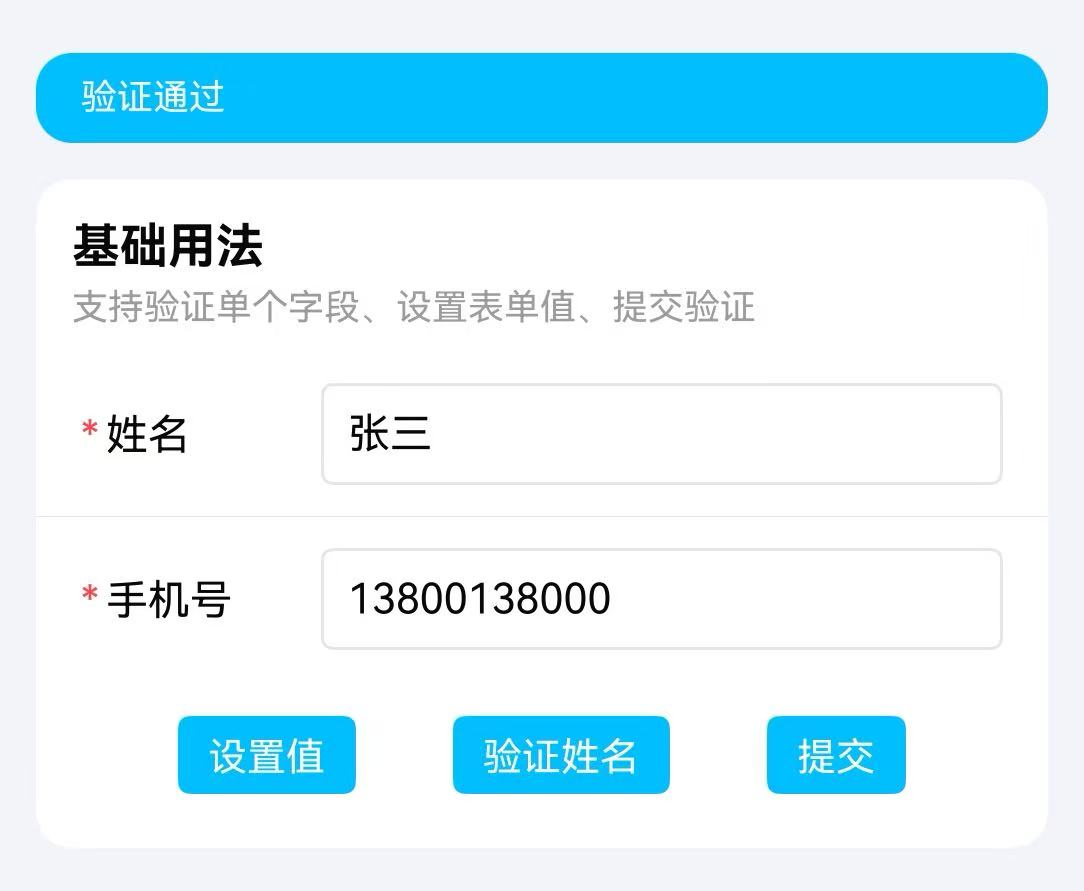
点我查看代码
typescript
@Local formController: TnFormController = new TnFormController();
@Local formData: Record<string, Object> = {
  username: "" as Object,
  phone: "" as Object,
};

Column() {
  TnForm({ controller: this.formController }) {
    TnFormItem({
      prop: "username",
      label: "用户名",
      required: true,
      rules: [
        { required: true, message: "请输入用户名" },
        { min: 2, max: 10, message: "用户名长度为 2-10 个字符" },
      ],
    }) {
      TextInput({ placeholder: "请输入用户名" })
        .onChange((value: string) => {
          this.formData["username"] = value as Object;
        })
    }
    TnFormItem({
      prop: "phone",
      label: "手机号",
      required: true,
      rules: [
        { required: true, message: "请输入手机号" },
        { pattern: /^1[3-9]\d{9}$/, message: "请输入正确的手机号" },
      ],
    }) {
      TextInput({ placeholder: "请输入手机号" })
        .onChange((value: string) => {
          this.formData["phone"] = value as Object;
        })
    }
  }

  TnButton({
    content: "提交",
    type: "primary",
    onBtnClick: async () => {
      const valid: boolean = await this.formController.validate();
      if (valid) {
        // 校验通过,提交表单
      }
    },
  })
}
自定义校验规则
通过 validator 属性传入自定义校验函数,支持异步校验。
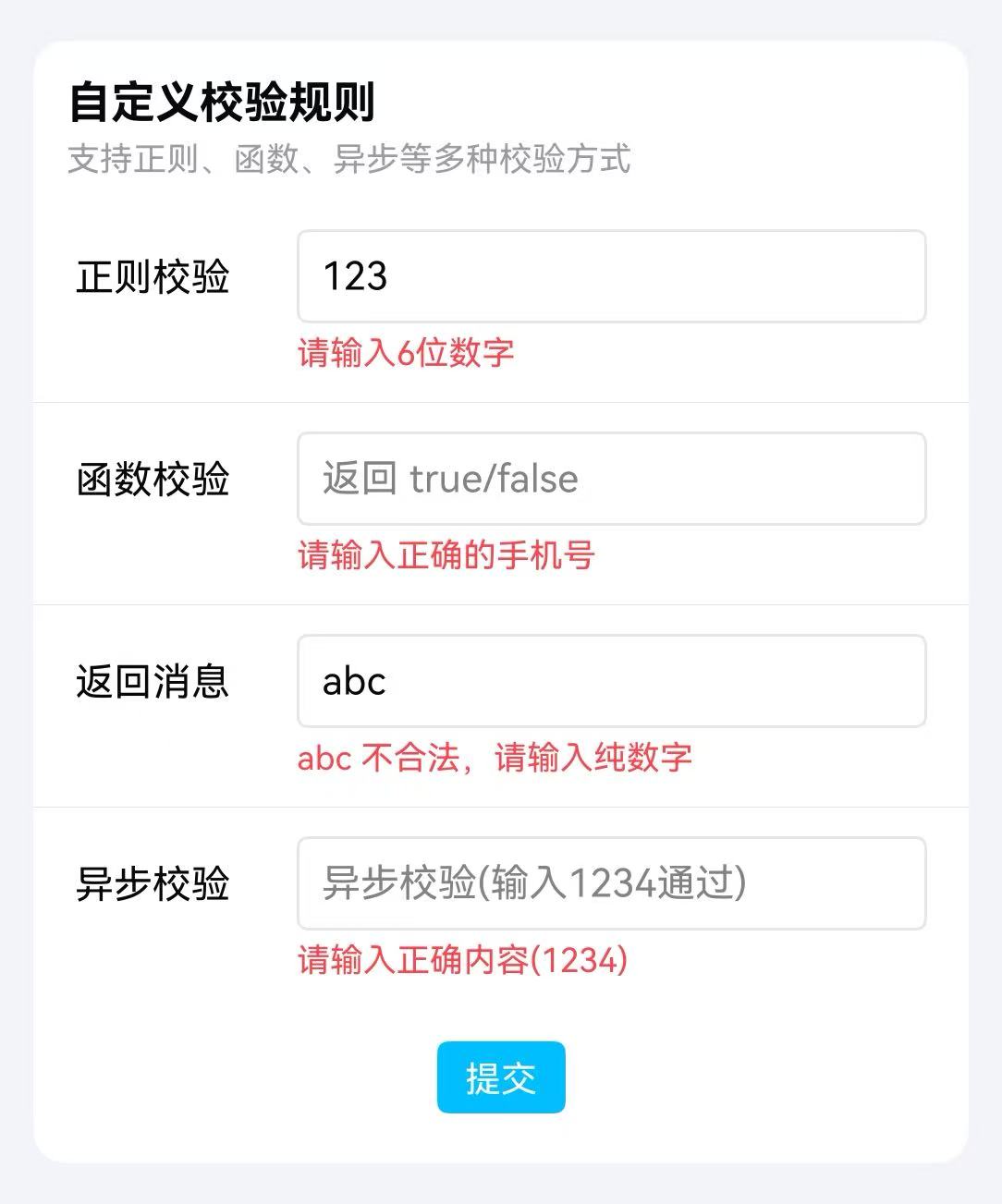
点我查看代码
typescript
@ObservedV2
export default class TnFormViewModel {
  /** 自定义校验表单数据 */
  @Trace customRuleForm: CustomRuleFormData = new CustomRuleFormData();
  /** 自定义校验表单控制器 */
  @Trace customRuleController: TnFormController = new TnFormController();
  /** 自定义校验表单 ID */
  readonly customRuleFormId: string = "customRuleForm";
  /** 正则校验模式 */
  private patternReg: RegExp = /\d{6}/;
  /** 函数校验器 */
  private funcValidator: (value: string) => boolean = (val: string): boolean => /1\d{10}/.test(val);
  /** 函数校验器(返回消息) */
  private funcMsgValidator: (value: string) => string = (val: string): string => {
    if (val.length === 0) {
      return "请输入内容";
    }
    if (!/^\d+$/.test(val)) {
      return `${val} 不合法,请输入纯数字`;
    }
    return "";
  };
  /** 异步校验器 */
  private asyncValidator: (value: string) => Promise<boolean> = (val: string): Promise<boolean> => {
    return new Promise<boolean>((resolve: (value: boolean) => void): void => {
      setTimeout((): void => {
        resolve(val === "1234");
      }, 1000);
    });
  };
  /** 自定义校验规则 */
  customRuleRules: TnFormRules = {
    "patternValue": [
      { pattern: this.patternReg, message: "请输入6位数字" } as TnFormRuleItem
    ],
    "funcValue": [
      { validator: this.funcValidator, message: "请输入正确的手机号" } as TnFormRuleItem
    ],
    "funcMsgValue": [
      { validator: this.funcMsgValidator } as TnFormRuleItem
    ],
    "asyncValue": [
      { validator: this.asyncValidator, message: "请输入正确内容(1234)" } as TnFormRuleItem
    ]
  };
  /**
   * 设置正则校验值
   * @param value 输入值
   */
  setPatternValue(value: string): void {
    this.customRuleForm.patternValue = value;
  }

  /**
   * 设置函数校验值
   * @param value 输入值
   */
  setFuncValue(value: string): void {
    this.customRuleForm.funcValue = value;
  }

  /**
   * 设置函数消息校验值
   * @param value 输入值
   */
  setFuncMsgValue(value: string): void {
    this.customRuleForm.funcMsgValue = value;
  }

  /**
   * 设置异步校验值
   * @param value 输入值
   */
  setAsyncValue(value: string): void {
    this.customRuleForm.asyncValue = value;
  }

  /**
   * 提交自定义校验表单
   */
  submitCustomRuleForm(): void {
    this.customRuleController.validate().then((res): void => {
      if (res.valid) {
        this.validateResultMsg = "自定义校验全部通过";
      } else {
        const labels: Array<string> = res.fields.map((item): string => item.message);
        this.validateResultMsg = labels.join("; ");
      }
    });
  }
}

@Local  vm: TnFormViewModel = new TnFormViewModel();

@Builder
private CustomRuleFormSection(): void {
  TnList({ title: "自定义校验规则", description: "支持正则、函数、异步等多种校验方式", card: true }) {
    TnForm({
      formId: this.vm.customRuleFormId,
      rules: this.vm.customRuleRules,
      controller: this.vm.customRuleController
    }) {
      TnListItem({ bottomBorder: true }) {
        TnFormItem({
          formId: this.vm.customRuleFormId,
          prop: "patternValue",
          label: "正则校验",
          value: this.vm.customRuleForm.patternValue
        }) {
          TnInput({
            modelValue: this.vm.customRuleForm.patternValue,
            placeholder: "请输入6位数字",
            onInput: (value: string): void => {
              this.vm.setPatternValue(value);
            }
          });
        };
      }

      TnListItem({ bottomBorder: true }) {
        TnFormItem({
          formId: this.vm.customRuleFormId,
          prop: "funcValue",
          label: "函数校验",
          value: this.vm.customRuleForm.funcValue
        }) {
          TnInput({
            modelValue: this.vm.customRuleForm.funcValue,
            placeholder: "返回 true/false",
            onInput: (value: string): void => {
              this.vm.setFuncValue(value);
            }
          });
        };
      }

      TnListItem({ bottomBorder: true }) {
        TnFormItem({
          formId: this.vm.customRuleFormId,
          prop: "funcMsgValue",
          label: "返回消息",
          value: this.vm.customRuleForm.funcMsgValue
        }) {
          TnInput({
            modelValue: this.vm.customRuleForm.funcMsgValue,
            placeholder: "返回验证信息",
            onInput: (value: string): void => {
              this.vm.setFuncMsgValue(value);
            }
          });
        };
      }

      TnListItem() {
        TnFormItem({
          formId: this.vm.customRuleFormId,
          prop: "asyncValue",
          label: "异步校验",
          value: this.vm.customRuleForm.asyncValue
        }) {
          TnInput({
            modelValue: this.vm.customRuleForm.asyncValue,
            placeholder: "异步校验(输入1234通过)",
            onInput: (value: string): void => {
              this.vm.setAsyncValue(value);
            }
          });
        };
      }
    };

    SpaceVerticalMedium();

    Row() {
      TnButton({
        content: "提交",
        type: "primary",
        btnSize: "sm",
        onBtnClick: (): void => {
          this.vm.submitCustomRuleForm();
        }
      });
    }
    .width(P100)
      .justifyContent(FlexAlign.Center)
      .padding({ bottom: SPACE.SM });
  }
}
标签位置
通过 TnFormItem 的 labelPosition 属性设置标签位置,支持 left(左侧)和 top(顶部)。
点我查看代码
typescript
Column() {
  TnForm() {
    TnFormItem({
      prop: "username",
      label: "用户名",
      labelPosition: "left",
      labelWidth: 80,
    }) {
      TextInput({ placeholder: "标签在左侧" })
    }
    TnFormItem({
      prop: "bio",
      label: "个人简介",
      labelPosition: "top",
    }) {
      TextArea({ placeholder: "标签在顶部" })
    }
  }
}
重置校验
通过 TnFormController 的 resetValidation 方法重置校验状态。不传参数时重置全部字段,传入字段名或字段名数组时仅重置指定字段。
点我查看代码
typescript
@Local formController: TnFormController = new TnFormController();
@Local formData: Record<string, Object> = {
  username: "" as Object,
  phone: "" as Object,
};

Column() {
  TnForm({ controller: this.formController }) {
    TnFormItem({
      prop: "username",
      label: "用户名",
      required: true,
      rules: [{ required: true, message: "请输入用户名" }],
    }) {
      TextInput({ placeholder: "请输入用户名" })
        .onChange((value: string) => {
          this.formData["username"] = value as Object;
        })
    }
    TnFormItem({
      prop: "phone",
      label: "手机号",
      required: true,
      rules: [{ required: true, message: "请输入手机号" }],
    }) {
      TextInput({ placeholder: "请输入手机号" })
        .onChange((value: string) => {
          this.formData["phone"] = value as Object;
        })
    }
  }

  Row({ space: 10 }) {
    TnButton({
      content: "重置全部",
      type: "info",
      onBtnClick: () => {
        this.formController.resetValidation();
      },
    })
    TnButton({
      content: "重置用户名",
      type: "info",
      onBtnClick: () => {
        this.formController.resetValidation("username");
      },
    })
  }
}
API
TnForm Props
| 参数 | 说明 | 类型 | 默认值 |
|---|---|---|---|
| formId | 表单唯一标识 | string | "" |
| rules | 验证规则集 | TnFormRules | {} |
| labelWidth | 标签宽度,单位 vp | number | 80 |
| labelPosition | 标签位置 | "left" | "top" | "left" |
| colon | 标签后是否显示冒号 | boolean | false |
| requireAsteriskPosition | 必填星号位置 | "left" | "right" | "left" |
| showMessage | 是否显示验证错误消息 | boolean | true |
| disabled | 是否禁用所有字段 | boolean | false |
| space | 字段间距,单位 vp | number | 0 |
| controller | 表单控制器实例 | TnFormController | new TnFormController() |
TnForm Slots
| 名称 | 说明 |
|---|---|
| defaultBuilder | 默认内容插槽,用于放置 TnFormItem 表单项 |
TnFormItem Props
| 参数 | 说明 | 类型 | 默认值 |
|---|---|---|---|
| formId | 表单标识,用于关联 TnForm | string | - |
| prop | 字段名,对应表单数据的 key | string | - |
| label | 标签文本 | ResourceStr | - |
| labelWidth | 标签宽度,单位 vp,0 表示继承 TnForm | number | 0 |
| labelPosition | 标签位置,不设置时继承 TnForm | "left" | "top" | - |
| required | 是否显示必填标识 | boolean | - |
| rules | 校验规则 | TnFormRuleItem[] | - |
| showMessage | 是否显示校验错误信息,不设置时继承 TnForm | boolean | - |
| value | 字段值,用于校验 | TnFieldValueType | "" |
TnFormItem Slots
| 名称 | 说明 |
|---|---|
| defaultBuilder | 默认内容插槽,用于放置输入组件 |
TnFormItem Events
| 事件名 | 说明 | 回调参数 |
|---|---|---|
| onValueChange | 字段值变化时触发 | (value: TnFieldValueType) => void |
TnFormController 方法
| 方法名 | 说明 | 参数 | 返回值 |
|---|---|---|---|
| validate | 校验全部字段 | callBack?: (valid: boolean, fields: TnFieldValidateInfo[]) => void | Promise<TnFormValidateResult> |
| validateField | 校验指定字段 | name: string, callBack?: (valid: boolean, field?: TnFieldValidateInfo) => void | Promise<TnFieldValidateResult> |
| resetValidation | 重置校验状态 | name?: string | string[] | void |
| getFormValues | 获取全部表单值 | - | Record<string, TnFieldValueType> |
| setFormValues | 批量设置表单值 | values: Record<string, TnFieldValueType> | void |